Welcome to ShoeVentory - where every pair matters!
Keep your closet and the ShoeVentory app aligned
ShoeVentory is most useful when it reflects what is on your shelves today!
When you donate or retire a pair, update or remove the item so counts stay honest.
After a big reorganize, skim your list and fix anything that moved to a new box, closet or room.
BIG TIP - Use the app before shopping to see whether you already own a similar style or color!
How to Organize Shoes Using Numbered Storage Boxes
Storing shoes in numbered boxes is one of the simplest ways to keep a closet clean, protect your footwear, and make it easy to find pairs quickly. This is where this app comes in! When you add a pair of shoes, put the box # of that shoe in the Location field in the app. Now that pair will never get lost in boxes again! The success of a numbered shoe system depends less on the boxes and more on consistency. Once every pair has a number and your collection is updated, you’ll always know exactly where everything is without digging through your closet.
Getting started: Photograph shoes in consistent lighting so colors stay accurate when you browse later. Add one pair at a time while you sort a shelf or closet—you can always edit details afterward. For pairs that look alike, note a unique detail in the description (buckle, stitching, insole brand). Keep the Background Simple -A clean background keeps focus on the shoes. Best Background colors:
White → ecommerce/catalog look
Light gray → luxury/editorial feel
Cream/beige → warmer lifestyle aesthetic
Black → only for bright or metallic shoes
A cheap trick: use a sheet of poster board curved against a wall to create a seamless backdrop.
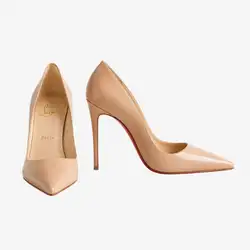
Here's an example of how to arrange your shoes so you only need 1 photo, but still capture all angels of the shoe.
Tags and categories
Custom Tags help you answer “what do I have for winter?” or “what purse goes with these shoes?” without opening every item.
Use tags for season, occasion, purse pairing, etc. The app allows you to filter custom tags when reviewing your collection.
Check back periodically—we may add new suggestions as feedback is received.